How to build a targeted outreach list
Choose firms, find relevant people, and keep your outreach organized.
By Maybole · Updated November 2026 · About 8 min read
A targeted outreach list is a researched set of people who can help answer a specific career question. It records why each person is relevant, where the information came from and what you should do next. Its value comes from that context, not the number of rows.
For a student exploring healthcare investment banking in New York, the list might begin with relevant firms and analysts or associates on teams you want to understand. It should not become every senior person at every finance company. Define the question first, then build the list around it.
Turn your goal into usable criteria
| Field | Example | Why it matters |
|---|---|---|
| Role or work | Healthcare investment banking | Keeps the conversation relevant to a specific activity. |
| Firm type | Advisory teams with relevant public work | Makes firm research more focused than a broad finance label. |
| Location | New York, with other feasible locations recorded separately | Helps you understand the team and your own practical constraints. |
| Person | A current analyst or associate who can describe the work | Chooses relevance rather than assuming the highest title is best. |
| Connection | Verified same-school background or a specific public work topic | Gives a factual reason for the introduction. |
Keep must-have criteria separate from preferences. If your list is too narrow, broaden one criterion and record why. You can learn from people without a shared school; a genuine interest in their actual work is a valid starting point. Do not invent a connection to justify a row.
Find firms before collecting names
Use employer sites, current postings, university resources and relevant public industry material to identify teams. Record the firm’s actual business and location. A familiar name alone does not tell you whether the team does the work you want to learn about.
- 1Create an initial firm list that fits your role and location.
- 2Read each team’s public work or role description.
- 3Identify people whose current responsibilities relate to your question.
- 4Check each person’s current role and firm against an appropriate current source.
- 5Record one observation you could use honestly in an introduction.
Build one useful record per person
| Field | Record |
|---|---|
| Identity | Name, current role, firm and location. |
| Source | The page or professional source and the date you checked it. |
| Reason to contact | The specific question this person can help answer. |
| Research note | A verified observation, genuine connection or relevant public project. |
| Work contact | The work address and how it was obtained or checked. |
| Status | Not contacted, sent, replied, conversation agreed, declined or do not contact. |
| Next action | What you intend to do and an appropriate date. |
Treat a guessed address as unconfirmed. A naming pattern does not establish that a particular address belongs to a current employee, and a deliverability check does not prove identity or willingness to receive a message. Recheck a person’s employer before using old contact details.
Clean the list before sending
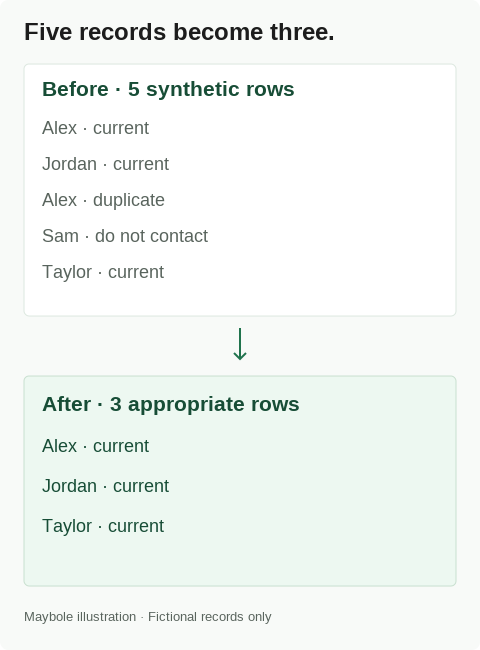
Turn a long list into a useful shortlist
Synthetic example people. Nothing is searched, unlocked, saved or sent from this illustration.
The method at a glance
- Filter
Select people relevant to the role, firm and location you are exploring.
- Verify
Check that the current role and employer still match and the work-contact details are appropriate.
- Deduplicate
Keep one current record for each person and honor do-not-contact preferences.
- Prioritize
Add a genuine research note, a reason for reaching out and the next action.
The demo removes one duplicate and one do-not-contact row. It changes only the fictional example in this page. In your own list, deduplicate people using enough context to distinguish namesakes. Respect a request not to be contacted, and do not reintroduce the same person from a second source.
- One person, one current record: merge useful source notes rather than sending twice.
- Current employer checked: an old address can be deliverable yet reach the wrong context.
- No-contact status preserved: a fresh import is not permission to ignore an earlier request.
- Facts traceable: keep the source for the claim you plan to mention.
- Next action explicit: a row should tell you what to do, not merely that the person exists.
Prioritize by relevance and readiness
Start with people whose role fits your question and whose background you can verify. A real connection can provide context, but there is no basis here to assign someone a probability of replying. If a row lacks a clear reason to contact the person, research it further or remove it.
| Check | Ready | Needs work |
|---|---|---|
| Relevance | The person can plausibly answer your specific question. | Only the company name is relevant. |
| Current facts | Role, employer and observation checked. | Old or conflicting information. |
| Message | One clear reason and one modest request. | Generic introduction with several asks. |
| Status | No duplicate or no-contact conflict. | Already contacted elsewhere or asked to stop. |
Use Finder without confusing preview and contact access
Maybole’s custom Finder searches require an active paid subscription, an approved legacy trial that has not ended, or existing usable credits. With search access, you can preview matching people before completing a drafting profile. Preview shows identity information such as available name, title, firm and city; protected work contact details remain locked. Choose the people you want and explicitly add them using credits.
Held people appear in Contacts. Select them and explicitly request drafts when you are ready. Draft setup asks for your résumé, reviewed background and templates if needed; saving those steps does not generate or send. Return to Contacts and explicitly Generate, review the drafts and send from your own mailbox. A guide never starts a search, spends credits or sends email for you.
Keep the list useful after the first email
Record the date, outcome and any next step the person actually suggested. A decline is a result to respect, not a prompt to find another address. After a conversation, keep the useful advice and any agreed follow-up. Before a later outreach cycle, recheck roles and remove stale assumptions.
Frequently asked questions
How big should my outreach list be?
Start with a group you can research, review and follow up with carefully. There is no evidence here for a universal ideal size. Relevance and current facts matter more than a row target.
Should I prioritize only senior people?
No. Choose people whose current work relates to your question. Junior professionals can often explain the work you are trying to understand; a senior title alone does not establish relevance.
Can I view work emails in Finder preview?
No. Protected contact details stay locked until you explicitly add selected people using credits. Search access requires an active paid subscription, an approved legacy trial that has not ended, or existing usable credits; completing the draft setup is not required to search.
Sources and further reading
- Harvard College: Guide to Making Connections
University guidance on identifying contacts, requesting conversations, preparing and maintaining professional relationships.
Source checked
Let Maybole do the hard part
Custom searches require an active paid subscription, an approved legacy trial that has not ended, or usable credits. New subscriptions charge immediately; no free trial is offered to new subscribers. These guides are free to read without signing up.
Search for the people you want to meet. Use credits to add your choices, then set up your profile for personal drafts. You review and send.
Get startedRelated guides